---
title: Setting Up Authorize.net as Your Payment Gateway for Core Registration
description: How to add Authorize.net as a payment gateway for Core Registration.
---
[Skip to content](https://help.eventmobi.com/en/knowledge/setting-up-authorizenet-gateway#main-content)
English
Show submenu for translations
[![1589391206704.png\]](https://help.eventmobi.com/hs-fs/hubfs/1589391206704.png?width=40&height=40&name=1589391206704.png)](https://help.eventmobi.com/?hsLang=en)
- [EventMobi Knowledge Base](https://help.eventmobi.com/)
Open main navigation
Close main navigation
- [EventMobi Knowledge Base](https://help.eventmobi.com/)
- English
Show submenu for translations
- [Product Updates & Feedback](https://updates.eventmobi.com/)
[Product Updates & Feedback](https://updates.eventmobi.com/)
What can we help you with?
- There are no suggestions because the search field is empty.
1. [EventMobi Knowledge Base](https://help.eventmobi.com/en/knowledge?hsLang=en)
2. [Event Organizers](https://help.eventmobi.com/en/knowledge/event-organizers?hsLang=en)
3. [Core Registration](https://help.eventmobi.com/en/knowledge/event-organizers?hsLang=en#core-registration)
December 5, 2025
# Setting Up Authorize.net as Your Payment Gateway for Core Registration
## How to add Authorize.net as a payment gateway for Core Registration.
****
**Table of Contents**
- [Finding Your API Key in Authorize.net](https://help.eventmobi.com/en/knowledge/setting-up-authorizenet-gateway#find-api-key)
- [Reviewing Your Statement Descriptor](https://help.eventmobi.com/en/knowledge/setting-up-authorizenet-gateway#review-statement-descriptor)
- [Connecting Authorize.net to EventMobi](https://help.eventmobi.com/en/knowledge/setting-up-authorizenet-gateway#connect-authorizenet-eventmobi)
- [Link Gateway to Event](https://help.eventmobi.com/en/knowledge/setting-up-authorizenet-gateway#link-to-event)
- [How To Test Your Payment Gateway](https://help.eventmobi.com/en/knowledge/setting-up-authorizenet-gateway#test-payment)
- [Managing Payments and Refunds with Authorize.net](https://help.eventmobi.com/en/knowledge/setting-up-authorizenet-gateway#refunds)
- [Understanding Authorize.net's Error Codes](https://help.eventmobi.com/en/knowledge/setting-up-authorizenet-gateway#error-codes)
- [How To Access Authorize.net's Support](https://help.eventmobi.com/en/knowledge/setting-up-authorizenet-gateway#support)
---
### Finding Your API Key in Authorize.net
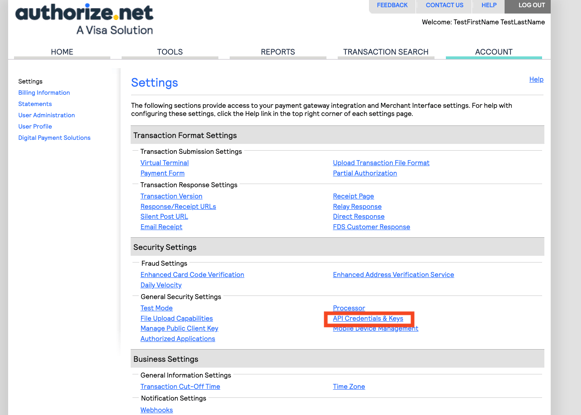
An API key from your Authorize.net account must be added to your Experience organization to connect your payment gateway and your Core Registration site(s). The instructions below outline how to create an API key from your Authorize.net account to use with EventMobi's Experience platform.
- Visit the **Account** area of your **Merchant Interface.**
- Select the **API Credentials & Keys** option from **Security Settings**.
- Click on **New Transaction Key** and then **Submit.**
- Enter the verification **PIN** sent to you.
- Copy the **Transaction Key** that was generated.
### Reviewing Your Statement Descriptor
Before connecting your payment gateway to EventMobi, review the Statement Descriptor set for your account to ensure it will be recognizable on a credit card statement.
If you want to change your Statement Descriptor, contact your Merchant Service Provider (the company that manages your deposits and merchant accounts with credit card providers).
**Why is this important?** Having a recognizable Statement Descriptor will help to prevent payment disputes.
### Connecting Authorize.net to EventMobi
Once you have your Authorize.net API Key, enter it into your Experience organization to connect your payment gateway to your events. The instructions below outline how to save your API key to Experience.
- Select **Payment Gateways** from the menu of your Experience Organization.
- Click on **Add Connection.**
- Input a **Name** to represent your payment gateway.
- Choose **Authorize.net** from the **Gateway** field.
- Paste in your **API Login ID** and **Transaction Key**.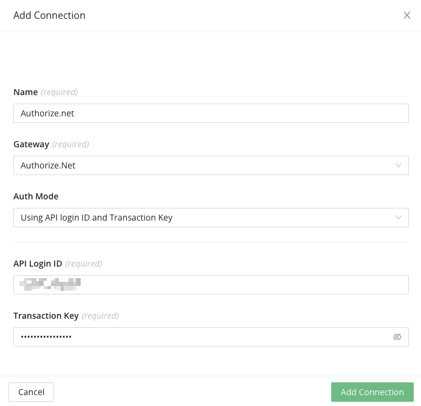
- Select **Add Connection** to save your setup.
- Refer to the **Status** area to confirm that your payment gateway is **Active**.
**See an Inactive Status?** Check the status of your credentials using the **Check Status** option in the Experience platform. If the status remains **Inactive**, you can try updating the status again later, or you will need to create a new gateway and repeat the steps above.
### Link the Gateway to Your Event
After connecting your payment gateway at the organization level, follow these steps to link it to your event:
1. Open the **Experience Manager**.
2. Go to your event and select **Registration** from the menu.
3. Click into **Registration Details**.
4. Navigate to the **Payment Settings** tab.
5. Choose the appropriate payment gateway from the **Gateway** dropdown menu.
Your gateway is now linked to this event and ready to be used for paid tickets.

### How To Test Your Payment Gateway
An actual payment must be processed to test your payment gateway. We recommend creating a ticket with a small fee (example: $1.00) to test, and then registering with a credit card.
Once the registration payment has been processed, you can initiate a refund from your payment gateway.
### Managing Payments and Refunds with Authorize.net
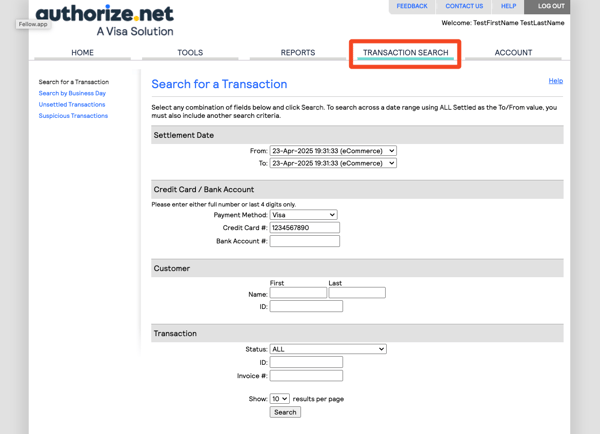
**Refunds for registration payments must be processed through your Authorize.net account**. You can follow the steps below to search for a transaction and to issue a refund.
- Select the **Transaction Search** option from the top menu.
- Use the search criteria to narrow down the transaction you're looking to review and refund.
- Click on the transaction ID for the transaction you want to refund, and select the **Refund** button at the top left of the page.
### Understanding Authorize.net's Error Codes
Authorize.net uses error codes to indicate the status of a request. You can find a detailed list on [Authorize.net's Support site](https://support.authorize.net/knowledgebase/Knowledgearticle/?code=KA-04306), but some of the error codes to take note of are:
- **Error 66: Transaction Not Accepted for Processing**: The payment doesn't meet security guidelines.
- **Error 325: Required fields are missing from the request:** The payment is missing details for required fields.
- **Error 327: Void request was unsuccessful**: A void request could not be processed.
### How To Access Authorize.net's Support
You can access additional resources and support related to your payment gateway account from [Authorize.net's Support Center](https://support.authorize.net/).
- [Event Organizers](https://help.eventmobi.com/en/knowledge/event-organizers?hsLang=en#main-content)
- [Experience Manager](https://help.eventmobi.com/en/knowledge/event-organizers?hsLang=en#experience-manager)
- [Attendee Engagement](https://help.eventmobi.com/en/knowledge/event-organizers?hsLang=en#attendee-engagement)
- [Branding & Design](https://help.eventmobi.com/en/knowledge/event-organizers?hsLang=en#branding-design)
- [Creating Profiles & Sessions](https://help.eventmobi.com/en/knowledge/event-organizers?hsLang=en#creating-profiles-sessions)
- [Event Communications](https://help.eventmobi.com/en/knowledge/event-organizers?hsLang=en#event-communications)
- [Onsite Events](https://help.eventmobi.com/en/knowledge/event-organizers?hsLang=en#onsite-events)
- [Virtual Events](https://help.eventmobi.com/en/knowledge/event-organizers?hsLang=en#virtual-events)
- [Core Registration](https://help.eventmobi.com/en/knowledge/event-organizers?hsLang=en#core-registration)
- [Extended Registration](https://help.eventmobi.com/en/knowledge/event-organizers?hsLang=en#extended-registration)
- [Reporting](https://help.eventmobi.com/en/knowledge/event-organizers?hsLang=en#reporting)
- [Sharing Resources](https://help.eventmobi.com/en/knowledge/event-organizers?hsLang=en#sharing-resources)
- [Sponsorship](https://help.eventmobi.com/en/knowledge/event-organizers?hsLang=en#sponsorship)
- [Launch the Event App](https://help.eventmobi.com/en/knowledge/event-organizers?hsLang=en#launch-the-event-app)
- [Event Services](https://help.eventmobi.com/en/knowledge/event-organizers?hsLang=en#event-services)
- [Event Information & Settings](https://help.eventmobi.com/en/knowledge/event-organizers?hsLang=en#event-information-settings)
- [Privacy & Security](https://help.eventmobi.com/en/knowledge/event-organizers?hsLang=en#privacy-security)
- [What's New](https://help.eventmobi.com/en/knowledge/event-organizers?hsLang=en#whats-new)
- [Call For Speakers](https://help.eventmobi.com/en/knowledge/event-organizers?hsLang=en#call-for-speakers)
- [Attendees & Speakers](https://help.eventmobi.com/en/knowledge/attendees-speakers?hsLang=en#main-content)
- [Using the Event App](https://help.eventmobi.com/en/knowledge/attendees-speakers?hsLang=en#using-the-event-app)
- [Access Resources as an Attendee](https://help.eventmobi.com/en/knowledge/attendees-speakers?hsLang=en#access-resources-as-an-attendee)
- [Share Resources as a Speaker](https://help.eventmobi.com/en/knowledge/attendees-speakers?hsLang=en#share-resources-as-a-speaker)
- [Manage Event Communications](https://help.eventmobi.com/en/knowledge/attendees-speakers?hsLang=en#manage-event-communications)
- [Connect With Others at the Event](https://help.eventmobi.com/en/knowledge/attendees-speakers?hsLang=en#connect-with-others-at-the-event)
- [Sponsors & Exhibitors](https://help.eventmobi.com/en/knowledge/sponsors-exhibitors?hsLang=en#main-content)
- [Exhibiting at an Event](https://help.eventmobi.com/en/knowledge/sponsors-exhibitors?hsLang=en#exhibiting-at-an-event)
- [Integration Hub](https://help.eventmobi.com/en/knowledge/integration-hub?hsLang=en#main-content)
- [EventMobi Integration Hub Solution](https://help.eventmobi.com/en/knowledge/integration-hub?hsLang=en#eventmobi-integration-hub-solution)
- [Simplify Your Processes with Automations](https://help.eventmobi.com/en/knowledge/integration-hub?hsLang=en#simplify-your-processes-with-automations)
- [Integrations from EventMobi to your solution](https://help.eventmobi.com/en/knowledge/integration-hub?hsLang=en#integrations-from-eventmobi-to-your-solution)
- [Integrations from your solution to EventMobi](https://help.eventmobi.com/en/knowledge/integration-hub?hsLang=en#integrations-from-your-solution-to-eventmobi)
- [Registration](https://help.eventmobi.com/en/knowledge/registration?hsLang=en#main-content)
- [Content](https://help.eventmobi.com/en/knowledge/registration?hsLang=en#content)
- [Design](https://help.eventmobi.com/en/knowledge/registration?hsLang=en#design)
[.png?width=147&height=34&name=EMI-logo-colour-dark-letters%20(1).png "EMI-logo-colour-dark-letters (1)")](https://www.eventmobi.com/)
© 2025 EventMobi™ A Trademark and Tradename of 5Touch Solutions Inc.
[Change your cookie preferences](https://www.eventmobi.com/cookie-declaration/)