---
title: "Managing Event Data and Attendee Requests: Backups, Deletions, and Password Resets"
description: Learn how to manage event data backups, handle attendee profile deletions, and reset attendee passwords in EventMobi to ensure privacy, security, and compliance.
---
[Skip to content](https://help.eventmobi.com/en/knowledge/managing-event-data-deletion-and-backups#main-content)
English
Show submenu for translations
[![1589391206704.png\]](https://help.eventmobi.com/hs-fs/hubfs/1589391206704.png?width=40&height=40&name=1589391206704.png)](https://help.eventmobi.com/?hsLang=en)
- [EventMobi Knowledge Base](https://help.eventmobi.com/)
Open main navigation
Close main navigation
- [EventMobi Knowledge Base](https://help.eventmobi.com/)
- English
Show submenu for translations
- [Product Updates & Feedback](https://updates.eventmobi.com/)
[Product Updates & Feedback](https://updates.eventmobi.com/)
What can we help you with?
- There are no suggestions because the search field is empty.
1. [EventMobi Knowledge Base](https://help.eventmobi.com/en/knowledge?hsLang=en)
2. [Event Organizers](https://help.eventmobi.com/en/knowledge/event-organizers?hsLang=en)
3. [Privacy & Security](https://help.eventmobi.com/en/knowledge/event-organizers?hsLang=en#privacy-security)
February 10, 2025
# Managing Event Data and Attendee Requests: Backups, Deletions, and Password Resets
## Learn how to manage event data backups, handle attendee profile deletions, and reset attendee passwords in EventMobi to ensure privacy, security, and compliance.
Table of Content:
1. [**Creating Backups of your Events**](https://help.eventmobi.com/en/knowledge/managing-event-data-deletion-and-backups#backups)
2. [**Deleting All Event Data**](https://help.eventmobi.com/en/knowledge/managing-event-data-deletion-and-backups#event-deletion)
3. [**Attendee Profile Deletion Requests**](https://help.eventmobi.com/en/knowledge/managing-event-data-deletion-and-backups#attendee-deletion-request)
4. [**Resetting Attendees' Account Passwords**](https://help.eventmobi.com/en/knowledge/managing-event-data-deletion-and-backups#resetting-attendees-passwords)
---
### 1. Creating Backups of your Events
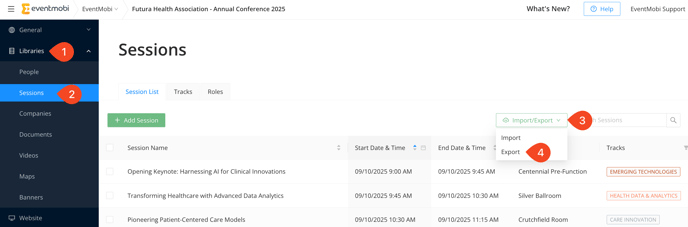
Backing up your event data is a smart way to preserve essential information for future reference. Save any assets, such as widget images, maps, event logos, and icons, that you might want to use again. For data stored in libraries that support Excel population (e.g., sessions, people, etc.), creating backups is straightforward:
1. Navigate to the library you want to back up.
2. Click **Import/Export** and choose **Export**.
3. Select **Download** to save your file.
Currently, only the **People**, **Sessions**, and **Companies** libraries support exporting.
For the **Documents** and **Video** libraries, files must be downloaded individually.
#### Important Recommendations
Before deleting any event data, especially attendee data, we strongly recommend downloading data such as:
- **Survey Results**
- **Analytics**
- **Activity Feed Posts**
Please note that analytics data will become **anonymous** after attendee data is deleted, making it impossible to attribute activity to specific users.
#### Access After Event Expiry
Your Event App will remain live for at least seven days after the event end date (depending on your event package). After the event expires:
- Content updates will no longer be possible.
- Attendees will lose access.
- Event organizers will still be able to access the Experience Manager and the Event App to review and export their data as needed.
#### What Steps Should I Take If I Accidentally Deleted Content?
If you notice that some of your content was accidentally deleted, here's how you can proceed:
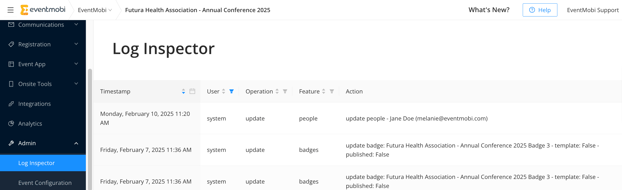
1. **Check the Log Inspector**:
- The **Log Inspector** located in the Admin area of the Experience Manager will show any updates made to the event, including the organizer responsible for the changes.
- If you suspect content was accidentally altered or deleted, check this log to see if it was an intentional update by another organizer.
2. **Content Retrieval Options**:
- - Every day at **12:00 a.m. Eastern Time**, a **backup** of your Experience Manager is saved. Any data saved as of this time is accessible for us to export or copy for you.
- **Note**: Any changes made after **12:00 a.m. Eastern Time** will not be available in the backup and will need to be re-added manually.
3. **What to Do Next**:
- - - If content was deleted accidentally, please contact **Support**. We may be able to assist you by restoring the backup data saved as of **12:00 a.m. Eastern Time**.
**Backup and Export Limitations**:
- **Backup** options (including Excel file exports) are only available for libraries that support this export function. As noted above, this applies to the **People**, **Sessions**, and **Companies** libraries.
- We can manually check specific settings and pages for you, but **images** and other media files cannot be restored from backups. These assets should be backed up separately by downloading them before deletion.
---
### 2. Deleting All Event Data
Event organizers cannot delete or archive events directly within their Experience Organization. Instead, deletion requests must be submitted to the EventMobi Support Team. This ensures proper handling of event data while adhering to privacy and security standards.
#### Important Information About Event Deletion
Before requesting event deletion, consider the following:
- **Irreversible Action**: Once an event is deleted, it **cannot be restored**.
- **Export Data First**: Organizers should export any data they wish to retain, such as:
- **People, Sessions, and Companies Libraries**
- **Documents and Videos** (download individually)
- **Survey Results, Analytics, and Activity Feed Posts, etc.** (to avoid loss of personalized data).
- **Timeline**: Deletion requests may take up to **7 days** to process.
#### Consequences of Event Deletion
Once the event is deleted:
- All associated data, including attendee activity, analytics, and uploaded files, will be permanently removed from EventMobi’s servers.
- Analytics data will be anonymized, and no personalized insights will be retrievable.
---
### 3. Attendee Profile Deletion Requests
Attendees have the right to request access to or deletion of their personal data in compliance with privacy laws such as GDPR and Apple's privacy regulations. Here’s a detailed guide to managing attendee profile deletion requests.
#### **How Attendees Can Submit Account Deletion Requests**
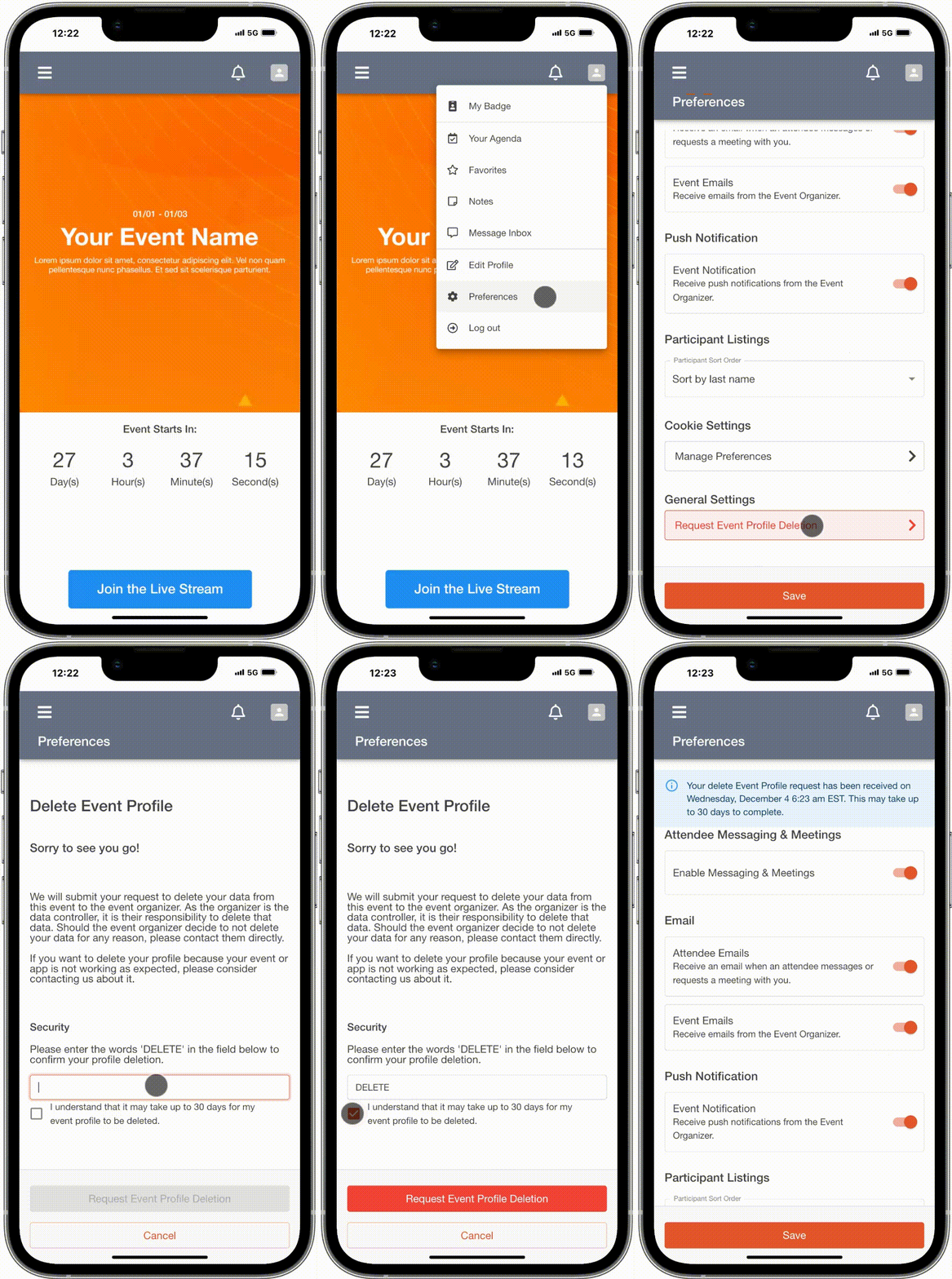
Attendees can submit account deletion requests through the **Preferences** section of their Attendee Dashboard in the Event App.
- **Steps to Submit a Request**:
1. Navigate to the Preferences area in the Attendee Dashboard.
2. Select the option to delete the account.
3. Enter the word **DELETE** as prompted to confirm the request.
4. Confirm the deletion through a confirmation message.
- **Notifications**:
- A **green notification** indicates a successful request submission.
- A **red notification** signals a failed request.
---
#### **Processing Account Deletion Requests**
Account deletion requests must be handled by the event organizer, who serves as the **data controller**. The process ensures compliance with privacy regulations and safeguards attendee data rights.
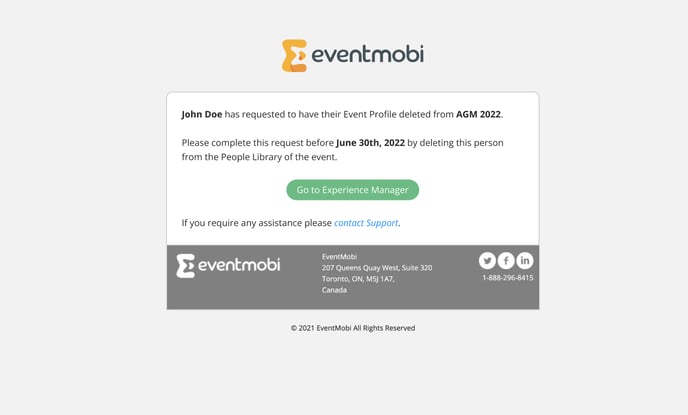
1. **Email Notification to Organizers**:
Once an attendee submits a deletion request, an email is sent to the listed event organizers. The email includes:
- Attendee Name
- Event Name
- Deadline for completing the deletion
2. **Steps to Process the Request**:
- Access the **People Library** in the Experience Manager.
- Locate the attendee’s profile.
- Delete the profile, which will also remove the following data:
- Activity Feed posts and comments
- Messages
- Uploaded files
- Confirm the deletion when prompted. **Note**: Once deleted, profiles and associated data cannot be restored.
3. **Impact on Analytics**:
While attendee profiles and related data will be deleted, analytics data tied to the profile will be anonymized.
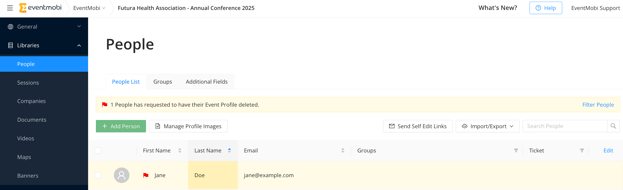
You can easily filter for attendee deletion requests in the People Library:
- Look for a **yellow banner** indicating the number of deletion requests submitted.
- Click **Filter People** to sort the list and bring the requests to the top.
---
#### **Legal and Compliance Considerations**
- **Mandatory Compliance**:
Event organizers are required to comply with account deletion requests to adhere to privacy laws and platform requirements, such as Apple’s guidelines. Non-compliance may result in:
- Legal repercussions
- Removal of the Event App from publication platforms
- **Clarification on Scope**:
- Deletion requests apply **only to the specific event** where the request was submitted.
- Attendee accounts will remain active for other events unless deletion requests are submitted for those events as well.
- **EventMobi’s Role in Account Deletion Requests:**
The organization delivering the event is considered the **data controller/owner** of any data added to the Experience Manager. This includes data added directly by the organization or through EventMobi as part of a Full-Service offering.
As the data controller/owner, **your organization** is responsible for manually processing account deletion requests submitted by attendees. EventMobi does not have the authority or legal permissions to process these requests on your behalf.
By understanding these responsibilities and acting accordingly, organizers can ensure compliance with privacy regulations and maintain trust with their attendees.
---
### 4. Resetting Attendees' Account Passwords
To protect user privacy and ensure security, attendees are required to log in to the Event App with a password. This aligns with GDPR guidelines and security best practices.
Here’s how the login process works:
- Attendees must use their **email address** as a username.
- The first time they log in, attendees create a **password** that applies to all EventMobi Event Apps they access.
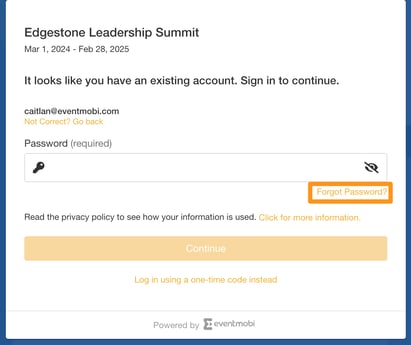
- Attendees can reset their password at any time via the **Forgot Password** link on the login screen.
Alternatively, attendees can use the **Log in using a one-time code instead** option to receive a secure login access code by email.
#### **Can I Reset Attendee Passwords as an Organizer?**
Password resets are personal and tied to the attendee's email address. Since usernames and passwords apply across all EventMobi platforms, organizers are not authorized to reset passwords on behalf of attendees.
**Exceptions:**
- If the attendee’s email address includes a domain owned by your organization (e.g., **@yourcompany.com**), you can request a password reset for these accounts through the Support team. Email addresses that do not include your organization’s domain must be reset by the attendee directly.
#### **How to Request a Password Reset for Organizational Domains:**
1. Locate the attendee’s email address within the **People** list in the Experience Manager.
2. Submit a password reset request to the Support team via chat or email.
3. Allow up to **5 business days** for the reset to be completed.
- [Event Organizers](https://help.eventmobi.com/en/knowledge/event-organizers?hsLang=en#main-content)
- [Experience Manager](https://help.eventmobi.com/en/knowledge/event-organizers?hsLang=en#experience-manager)
- [Attendee Engagement](https://help.eventmobi.com/en/knowledge/event-organizers?hsLang=en#attendee-engagement)
- [Branding & Design](https://help.eventmobi.com/en/knowledge/event-organizers?hsLang=en#branding-design)
- [Creating Profiles & Sessions](https://help.eventmobi.com/en/knowledge/event-organizers?hsLang=en#creating-profiles-sessions)
- [Event Communications](https://help.eventmobi.com/en/knowledge/event-organizers?hsLang=en#event-communications)
- [Onsite Events](https://help.eventmobi.com/en/knowledge/event-organizers?hsLang=en#onsite-events)
- [Virtual Events](https://help.eventmobi.com/en/knowledge/event-organizers?hsLang=en#virtual-events)
- [Core Registration](https://help.eventmobi.com/en/knowledge/event-organizers?hsLang=en#core-registration)
- [Extended Registration](https://help.eventmobi.com/en/knowledge/event-organizers?hsLang=en#extended-registration)
- [Reporting](https://help.eventmobi.com/en/knowledge/event-organizers?hsLang=en#reporting)
- [Sharing Resources](https://help.eventmobi.com/en/knowledge/event-organizers?hsLang=en#sharing-resources)
- [Sponsorship](https://help.eventmobi.com/en/knowledge/event-organizers?hsLang=en#sponsorship)
- [Launch the Event App](https://help.eventmobi.com/en/knowledge/event-organizers?hsLang=en#launch-the-event-app)
- [Event Services](https://help.eventmobi.com/en/knowledge/event-organizers?hsLang=en#event-services)
- [Event Information & Settings](https://help.eventmobi.com/en/knowledge/event-organizers?hsLang=en#event-information-settings)
- [Privacy & Security](https://help.eventmobi.com/en/knowledge/event-organizers?hsLang=en#privacy-security)
- [What's New](https://help.eventmobi.com/en/knowledge/event-organizers?hsLang=en#whats-new)
- [Call For Speakers](https://help.eventmobi.com/en/knowledge/event-organizers?hsLang=en#call-for-speakers)
- [Attendees & Speakers](https://help.eventmobi.com/en/knowledge/attendees-speakers?hsLang=en#main-content)
- [Using the Event App](https://help.eventmobi.com/en/knowledge/attendees-speakers?hsLang=en#using-the-event-app)
- [Access Resources as an Attendee](https://help.eventmobi.com/en/knowledge/attendees-speakers?hsLang=en#access-resources-as-an-attendee)
- [Share Resources as a Speaker](https://help.eventmobi.com/en/knowledge/attendees-speakers?hsLang=en#share-resources-as-a-speaker)
- [Manage Event Communications](https://help.eventmobi.com/en/knowledge/attendees-speakers?hsLang=en#manage-event-communications)
- [Connect With Others at the Event](https://help.eventmobi.com/en/knowledge/attendees-speakers?hsLang=en#connect-with-others-at-the-event)
- [Sponsors & Exhibitors](https://help.eventmobi.com/en/knowledge/sponsors-exhibitors?hsLang=en#main-content)
- [Exhibiting at an Event](https://help.eventmobi.com/en/knowledge/sponsors-exhibitors?hsLang=en#exhibiting-at-an-event)
- [Integration Hub](https://help.eventmobi.com/en/knowledge/integration-hub?hsLang=en#main-content)
- [EventMobi Integration Hub Solution](https://help.eventmobi.com/en/knowledge/integration-hub?hsLang=en#eventmobi-integration-hub-solution)
- [Simplify Your Processes with Automations](https://help.eventmobi.com/en/knowledge/integration-hub?hsLang=en#simplify-your-processes-with-automations)
- [Integrations from EventMobi to your solution](https://help.eventmobi.com/en/knowledge/integration-hub?hsLang=en#integrations-from-eventmobi-to-your-solution)
- [Integrations from your solution to EventMobi](https://help.eventmobi.com/en/knowledge/integration-hub?hsLang=en#integrations-from-your-solution-to-eventmobi)
- [Registration](https://help.eventmobi.com/en/knowledge/registration?hsLang=en#main-content)
- [Content](https://help.eventmobi.com/en/knowledge/registration?hsLang=en#content)
- [Design](https://help.eventmobi.com/en/knowledge/registration?hsLang=en#design)
[.png?width=147&height=34&name=EMI-logo-colour-dark-letters%20(1).png "EMI-logo-colour-dark-letters (1)")](https://www.eventmobi.com/)
© 2025 EventMobi™ A Trademark and Tradename of 5Touch Solutions Inc.
[Change your cookie preferences](https://www.eventmobi.com/cookie-declaration/)