![1589391206704.png]](https://help.eventmobi.com/hs-fs/hubfs/1589391206704.png?width=40&height=40&name=1589391206704.png)

How it works
When you add one or more domains to the Whitelisted Domains list, EventMobi checks the email address a person enters during registration. If the part after the @ matches a domain on your list, the person can continue. If it doesn't match, registration is blocked and the person is notified that registration is restricted.
If you leave the field empty, no domain restriction is applied and anyone can register.
Where to find it
- Go to the Registration > Registration Details
- Locate the Restrict your Registration to section and the Whitelisted Domains field.
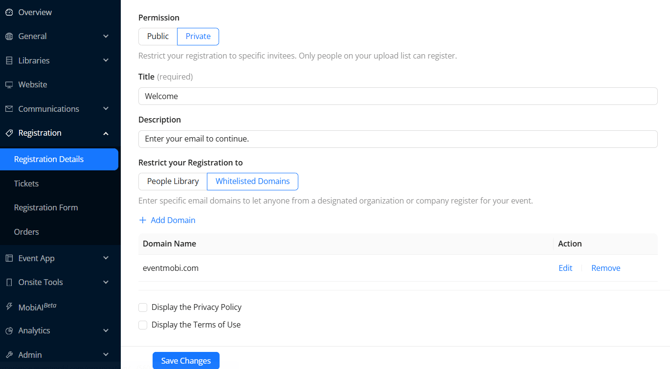
Adding domains to the whitelist
- In the Whitelisted Domains field, enter each domain you want to allow.
- Enter the domain only — the portion that appears after the
@in an email address. For example, useeventmobi.com, not@eventmobi.comorjane@eventmobi.com. - Add as many domains as you need to cover every organization that should have access.
- Save the form.
Once saved, the restriction takes effect immediately for new registrations.
Formatting tips
- Enter one clean domain per entry (for example,
eventmobi.com,partnercompany.org,university.edu). - Include every domain variation your audience might use. If an organization registers under both
company.comandcompany.co.uk, add both. - Watch for common typos and subdomains.
mail.company.comwill not match a whitelist entry ofcompany.com— add it separately if attendees use it. - Double-check spelling. A misspelled domain silently blocks the very people you meant to allow.
The Registrant Experience
A person whose email domain is on the list registers normally with no interruption. A person whose domain is not on the list is stopped during registration and shown a message explaining that registration is restricted. They will not be able to complete sign-up with that email address.
When To Use & When To Avoid
Whitelisted Domains works best when your eligible audience shares a small, predictable set of email domains — a single company, a group of partner organizations, or a set of member institutions.
It is a weaker fit when your audience uses personal email addresses (Gmail, Outlook, Yahoo, and similar), since you would either have to allow those broad domains (which lets in almost anyone) or block legitimate attendees.