---
title: Recording Interactive Breakout Rooms
description: This article will explain how Moderators can record their Breakout Rooms and where they can find the recordings
---
[Skip to content](https://help.eventmobi.com/en/knowledge/recording-interactive-breakout-rooms#main-content)
English
Show submenu for translations
[![1589391206704.png\]](https://help.eventmobi.com/hs-fs/hubfs/1589391206704.png?width=40&height=40&name=1589391206704.png)](https://help.eventmobi.com/?hsLang=en)
- [EventMobi Knowledge Base](https://help.eventmobi.com/)
Open main navigation
Close main navigation
- [EventMobi Knowledge Base](https://help.eventmobi.com/)
- English
Show submenu for translations
- [Product Updates & Feedback](https://updates.eventmobi.com/)
[Product Updates & Feedback](https://updates.eventmobi.com/)
What can we help you with?
- There are no suggestions because the search field is empty.
1. [EventMobi Knowledge Base](https://help.eventmobi.com/en/knowledge?hsLang=en)
2. [Event Organizers](https://help.eventmobi.com/en/knowledge/event-organizers?hsLang=en)
3. [Virtual Events](https://help.eventmobi.com/en/knowledge/event-organizers?hsLang=en#virtual-events)
December 2, 2025
# Recording Interactive Breakout Rooms
## This article will explain how Moderators can record their Breakout Rooms and where they can find the recordings
Our Interactive Breakout Rooms give Moderators the ability to record the breakout room so that the engaging conversations aren't lost and can be reviewed later. We will walk through how to:
**Jump to..**
[Start Recording](https://help.eventmobi.com/en/knowledge/recording-interactive-breakout-rooms#startrecording)
[End Recording](https://help.eventmobi.com/en/knowledge/recording-interactive-breakout-rooms#endrecording)
[Find Your Recordings](https://help.eventmobi.com/en/knowledge/recording-interactive-breakout-rooms#findrecording)
Recording an Interactive Breakout Room is a **Moderator only** feature. You will want to ensure the person that is recording the session is entered in the **Moderator** field in the Experience Manager.
Recording is currently only possible with **Google Chrome.** If you are not using this browser type, please note that the recording option will not be available.
### **Start Recording**
**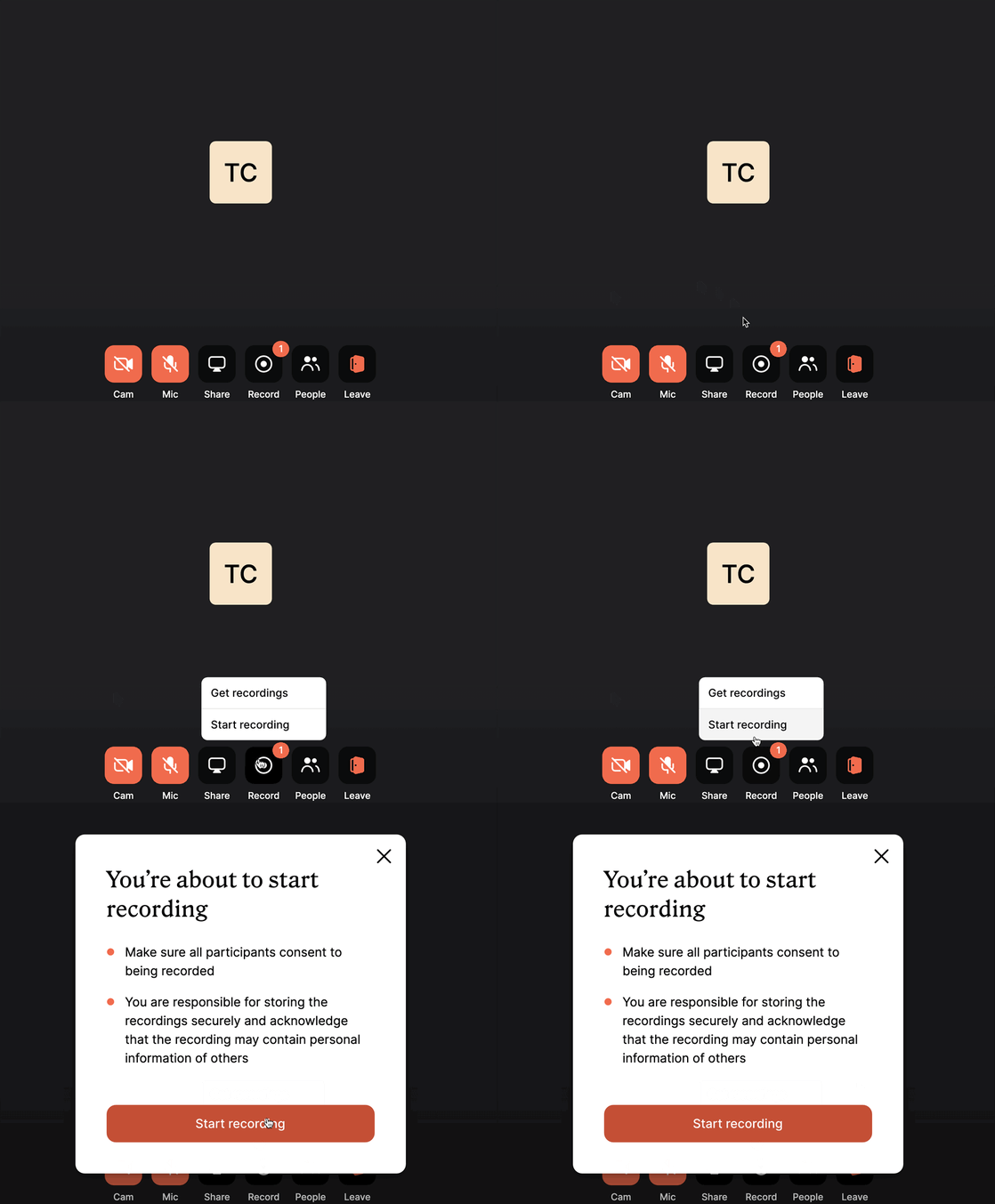**
Once you join the room, if you're assigned as the Moderator by the event Organizer, you will have the option to record the session. To record the session, you will hover over the Record icon and click "**Start Recording"** or simply click on the record button to initiate the process.
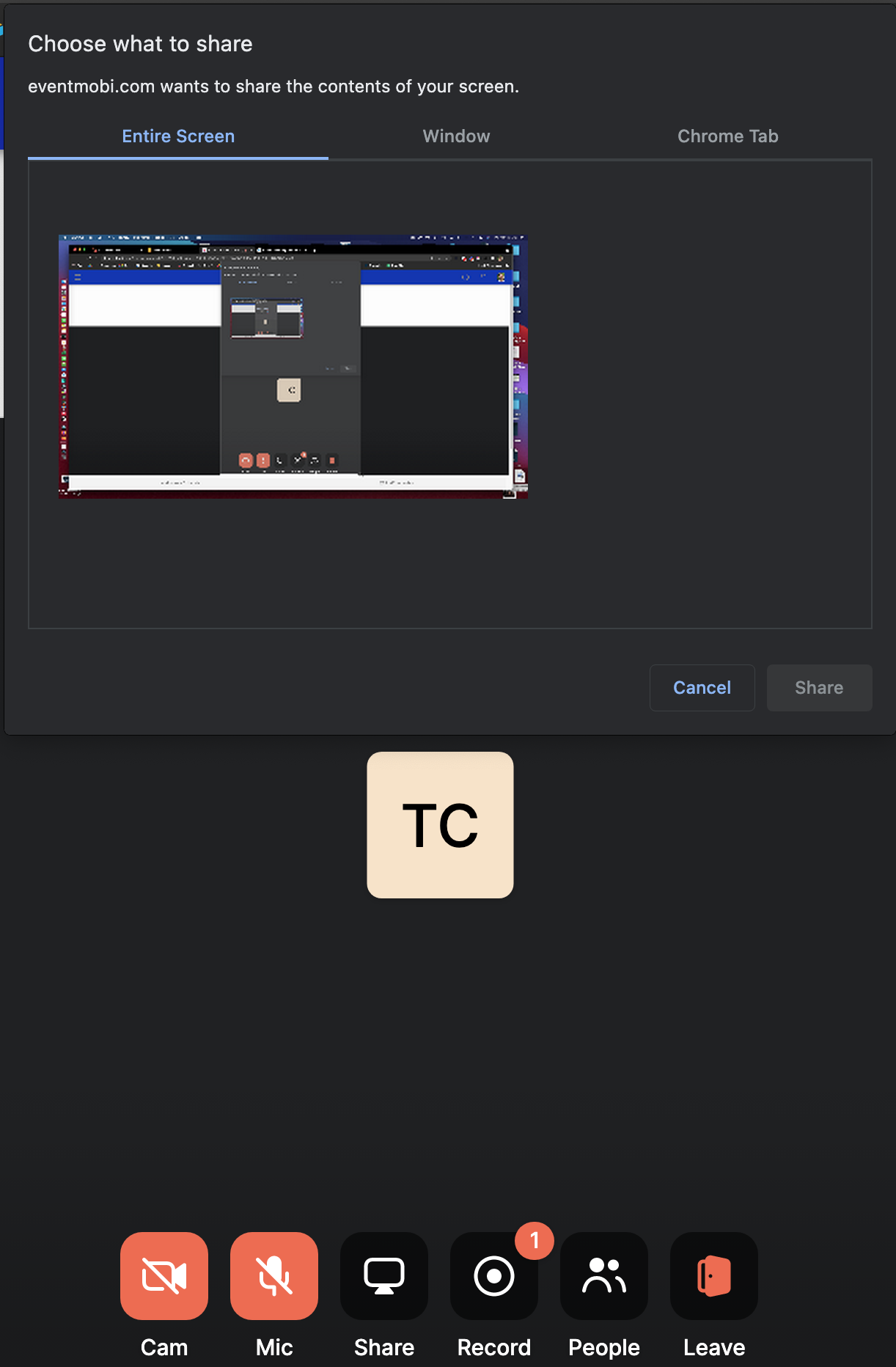
Once you've initiated the recording process, you will be prompted to click on the screen you would like to record.
Similar to a screenshare you would find in a conference meeting tool, you will select the screen, window, or tab that you would like to record.
Now that you have selected the screen you would like to record, click **"Share"** at the bottom right of the notification to start recording.
**Note:** You will want to make sure that you are selecting the **Specific Chrome Tab** option when recording. Selecting the 'Entire Screen' or 'Specific Window' options may prevent you from being able to download the recording file.

You're now recording! You can confirm that you're recording by looking at your own image and you will now find a **Red Recording Dot** at the top left of your camera or initials depending on if you have your camera on or not.
### **End Recording**
**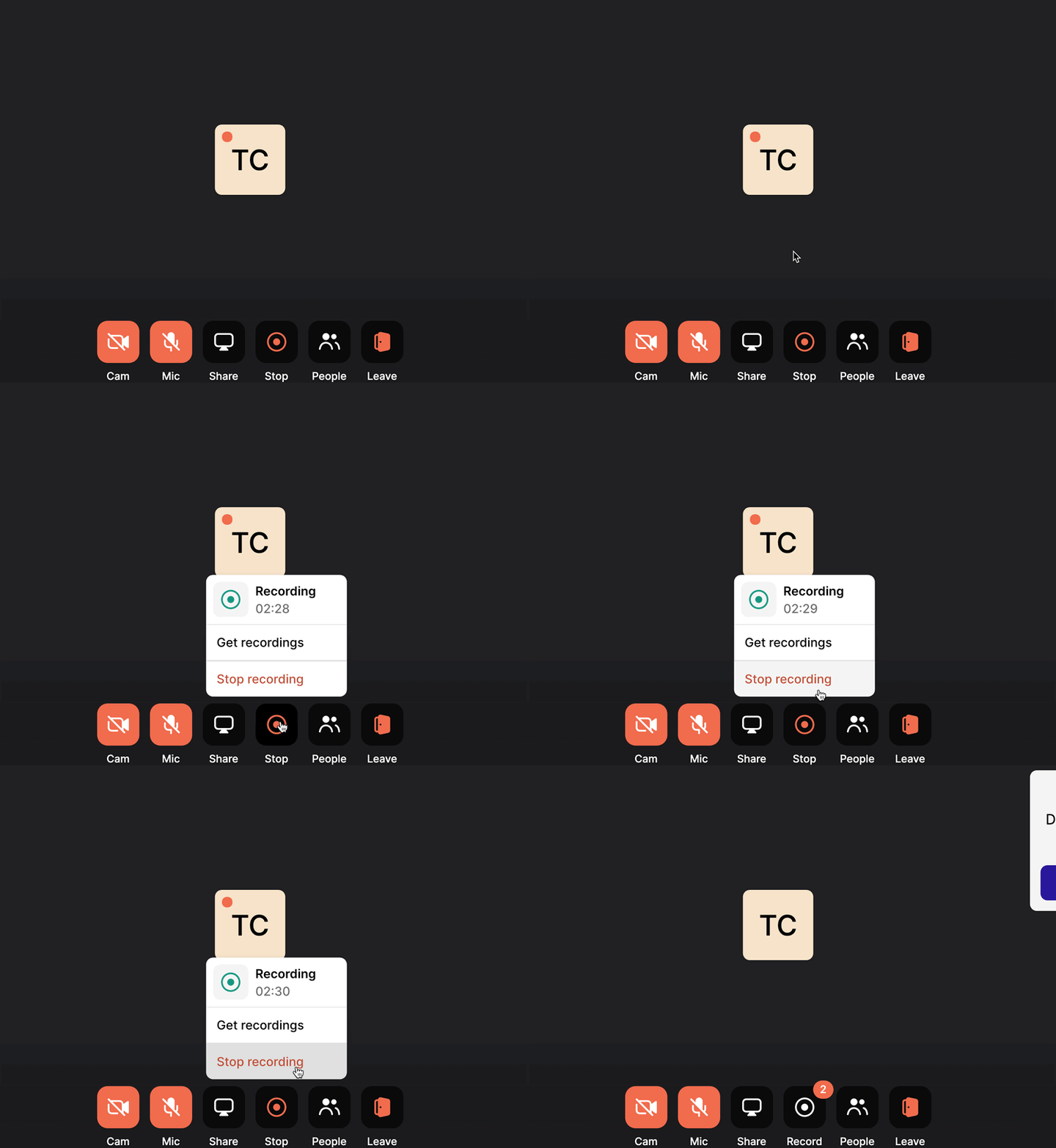**
When you're done recording your session, you can stop the recording by hovering over the Record icon and click **"Stop Recording"** or simply click the icon to stop the process immediately.
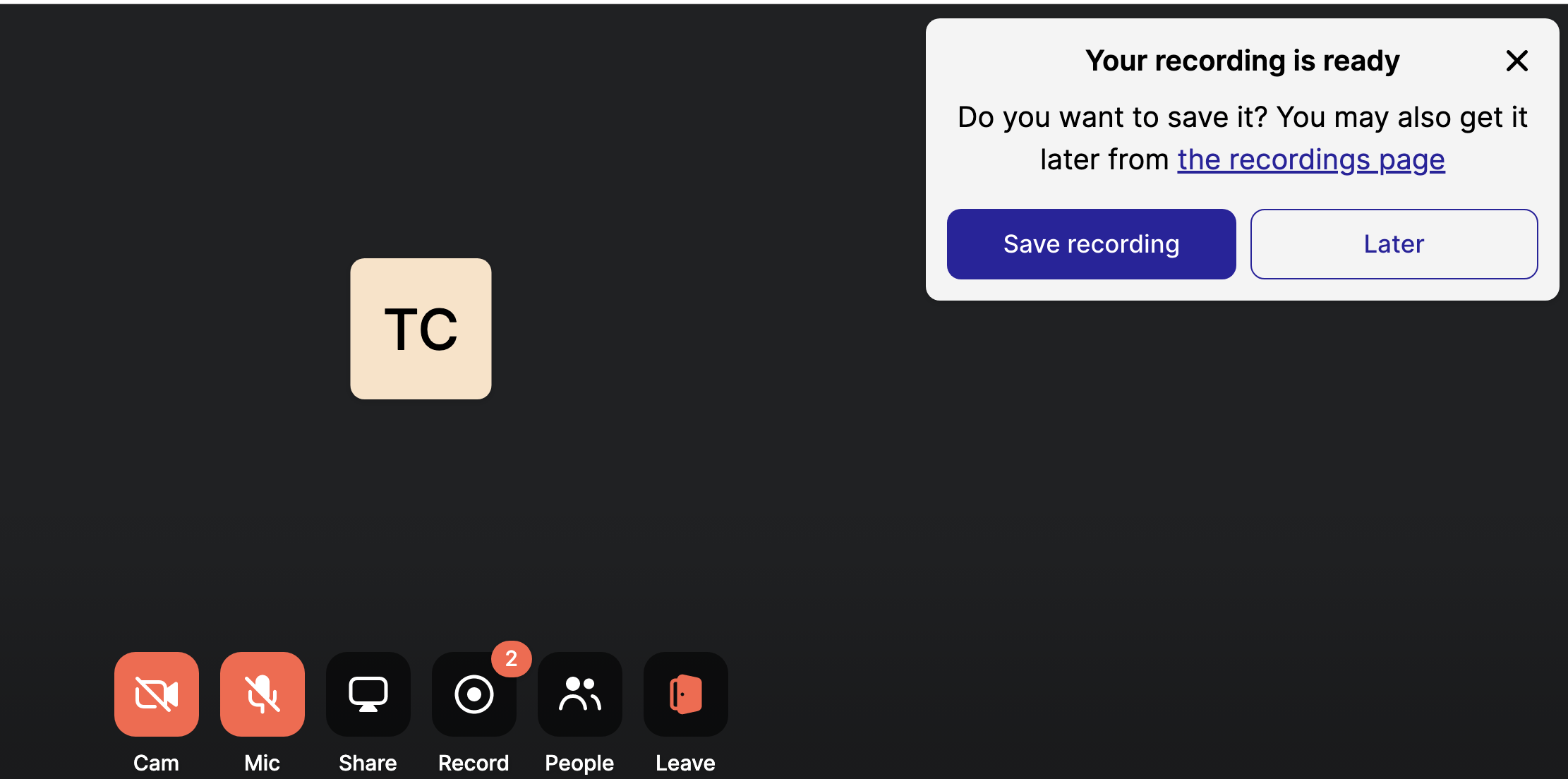
As soon as you click Stop Recording, you will be prompted to **Save Recording** or view **Later** to access and download the recording at a later time.
Clicking **Save Recording** will automatically download the file to your computer. **Later** will save the video to our recording page to viewed and downloaded later.
### **Find your Recording**
**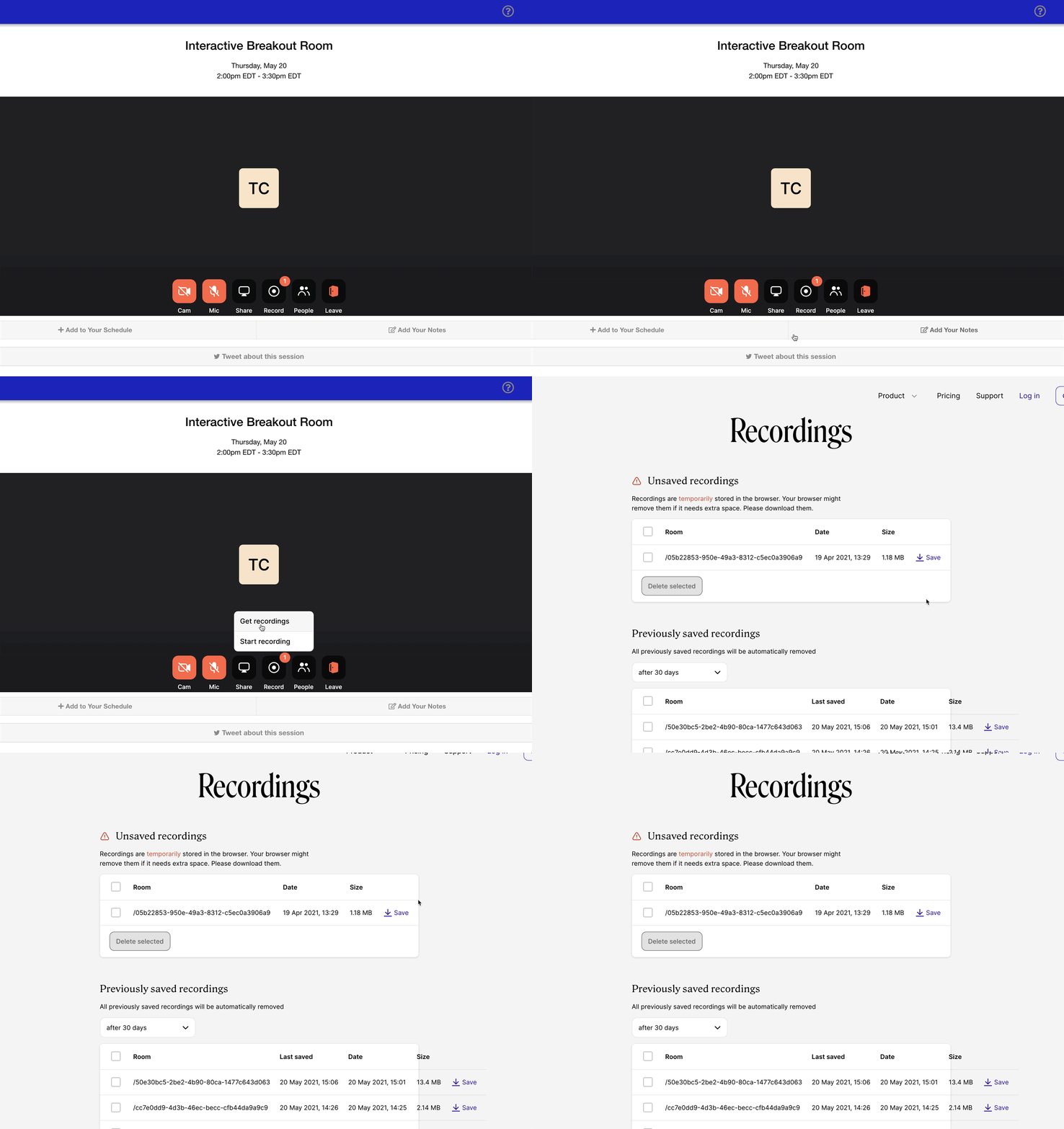**
If you chose to view your recording Later, you can go back to any of the breakout rooms that have been set up and join to see the Record icon. There will now be a number above the recording icon to indicate that there are recordings waiting to be saved.
Clicking **Get Recording** will automatically redirect you to our Recordings Page to save and download the Recording.
**This section is organized in two ways:**
1\. Unsaved recordings will hold all recordings that have not been downloaded by you
2\. Previously Saved Recordings will indicate sessions that have been saved/downloaded and can be re-downloaded if needed
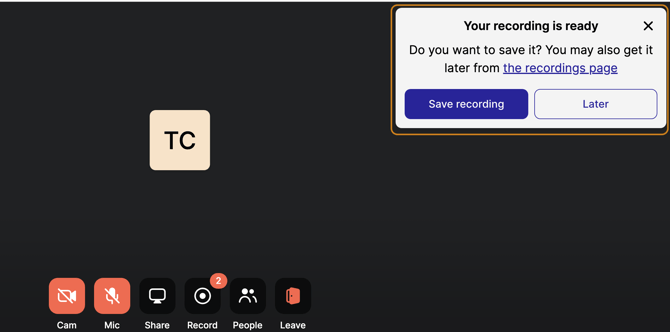
If you happen to have sessions that have not yet been saved, you will notice a notification pop up the next time that you enter an Interactive Breakout Room. This notification will act as a reminder to download and save the recording.
If you no longer have access to the Interactive Breakout Session, you can attempt to locate your recordings here: **https://eventmobi.whereby.com/user/get-recording.**
Your browser will attempt to save the recordings for up to 30 days. If the file is too big, you may not be able to find the unsaved recording.
- [Event Organizers](https://help.eventmobi.com/en/knowledge/event-organizers?hsLang=en#main-content)
- [Experience Manager](https://help.eventmobi.com/en/knowledge/event-organizers?hsLang=en#experience-manager)
- [Attendee Engagement](https://help.eventmobi.com/en/knowledge/event-organizers?hsLang=en#attendee-engagement)
- [Branding & Design](https://help.eventmobi.com/en/knowledge/event-organizers?hsLang=en#branding-design)
- [Creating Profiles & Sessions](https://help.eventmobi.com/en/knowledge/event-organizers?hsLang=en#creating-profiles-sessions)
- [Event Communications](https://help.eventmobi.com/en/knowledge/event-organizers?hsLang=en#event-communications)
- [Onsite Events](https://help.eventmobi.com/en/knowledge/event-organizers?hsLang=en#onsite-events)
- [Virtual Events](https://help.eventmobi.com/en/knowledge/event-organizers?hsLang=en#virtual-events)
- [Core Registration](https://help.eventmobi.com/en/knowledge/event-organizers?hsLang=en#core-registration)
- [Extended Registration](https://help.eventmobi.com/en/knowledge/event-organizers?hsLang=en#extended-registration)
- [Reporting](https://help.eventmobi.com/en/knowledge/event-organizers?hsLang=en#reporting)
- [Sharing Resources](https://help.eventmobi.com/en/knowledge/event-organizers?hsLang=en#sharing-resources)
- [Sponsorship](https://help.eventmobi.com/en/knowledge/event-organizers?hsLang=en#sponsorship)
- [Launch the Event App](https://help.eventmobi.com/en/knowledge/event-organizers?hsLang=en#launch-the-event-app)
- [Event Services](https://help.eventmobi.com/en/knowledge/event-organizers?hsLang=en#event-services)
- [Event Information & Settings](https://help.eventmobi.com/en/knowledge/event-organizers?hsLang=en#event-information-settings)
- [Privacy & Security](https://help.eventmobi.com/en/knowledge/event-organizers?hsLang=en#privacy-security)
- [What's New](https://help.eventmobi.com/en/knowledge/event-organizers?hsLang=en#whats-new)
- [Call For Speakers](https://help.eventmobi.com/en/knowledge/event-organizers?hsLang=en#call-for-speakers)
- [Attendees & Speakers](https://help.eventmobi.com/en/knowledge/attendees-speakers?hsLang=en#main-content)
- [Using the Event App](https://help.eventmobi.com/en/knowledge/attendees-speakers?hsLang=en#using-the-event-app)
- [Access Resources as an Attendee](https://help.eventmobi.com/en/knowledge/attendees-speakers?hsLang=en#access-resources-as-an-attendee)
- [Share Resources as a Speaker](https://help.eventmobi.com/en/knowledge/attendees-speakers?hsLang=en#share-resources-as-a-speaker)
- [Manage Event Communications](https://help.eventmobi.com/en/knowledge/attendees-speakers?hsLang=en#manage-event-communications)
- [Connect With Others at the Event](https://help.eventmobi.com/en/knowledge/attendees-speakers?hsLang=en#connect-with-others-at-the-event)
- [Sponsors & Exhibitors](https://help.eventmobi.com/en/knowledge/sponsors-exhibitors?hsLang=en#main-content)
- [Exhibiting at an Event](https://help.eventmobi.com/en/knowledge/sponsors-exhibitors?hsLang=en#exhibiting-at-an-event)
- [Integration Hub](https://help.eventmobi.com/en/knowledge/integration-hub?hsLang=en#main-content)
- [EventMobi Integration Hub Solution](https://help.eventmobi.com/en/knowledge/integration-hub?hsLang=en#eventmobi-integration-hub-solution)
- [Simplify Your Processes with Automations](https://help.eventmobi.com/en/knowledge/integration-hub?hsLang=en#simplify-your-processes-with-automations)
- [Integrations from EventMobi to your solution](https://help.eventmobi.com/en/knowledge/integration-hub?hsLang=en#integrations-from-eventmobi-to-your-solution)
- [Integrations from your solution to EventMobi](https://help.eventmobi.com/en/knowledge/integration-hub?hsLang=en#integrations-from-your-solution-to-eventmobi)
- [Registration](https://help.eventmobi.com/en/knowledge/registration?hsLang=en#main-content)
- [Content](https://help.eventmobi.com/en/knowledge/registration?hsLang=en#content)
- [Design](https://help.eventmobi.com/en/knowledge/registration?hsLang=en#design)
[.png?width=147&height=34&name=EMI-logo-colour-dark-letters%20(1).png "EMI-logo-colour-dark-letters (1)")](https://www.eventmobi.com/)
© 2025 EventMobi™ A Trademark and Tradename of 5Touch Solutions Inc.
[Change your cookie preferences](https://www.eventmobi.com/cookie-declaration/)