![1589391206704.png]](https://help.eventmobi.com/hs-fs/hubfs/1589391206704.png?width=40&height=40&name=1589391206704.png)

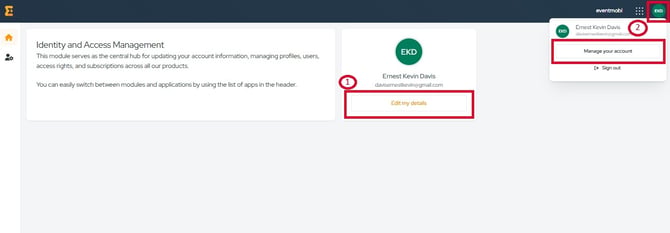
To manage your extended registration account identity, the first step is to access the Identity Module.

- If you are in the Identity module: click the "Edit my details" button.
- If you are in any other page: click your profile initials in the top right corner then select "Manage your account".
User Details Modification
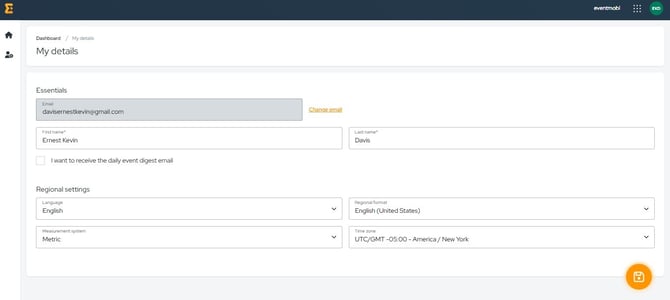
On the My details page, you can access and update your Essentials and Regional Settings.In the Essentials Settings, you can update:
- Your email address – This field is required.
- Your first and last name – These fields are also required.
- Daily Event Digest email – Enable this checkbox to receive a daily automated email with statistics from the past 24 hours for your event.
In the Regional Settings, you can choose:
- Backend Language – The language used for menus and settings in your dashboard.
- Regional Format – Defines regional formats for dates, times, and other preferences.
- Measurement system – Select either the Metric or Imperial system.
- Time Zone – Choose the time zone for your location.