![1589391206704.png]](https://help.eventmobi.com/hs-fs/hubfs/1589391206704.png?width=40&height=40&name=1589391206704.png)

Table of Contents:
1. Where to find MobiAI
2. Global Settings - How To Set Up
3. Configuring Registration Concierge
Where to find MobiAI
To configure and customize MobiAI, follow these steps within Experience Manager:
- From the main dashboard, navigate to the MobiAI section on the left hand menu.
- Click on MobiAI.
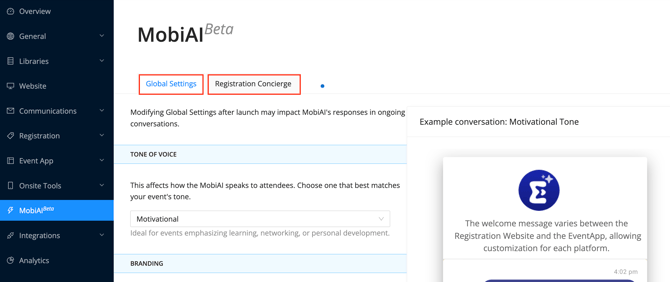
-
Global Settings – Customize tone, branding, avatar, colour, and font style.
-
Registration Concierge – Manage MobiAI’s interactions with attendees during registration.
Global Settings - How To Set Up
The Global Settings tab allows you to customize how MobiAI communicates and appears to attendees. This includes defining its tone of voice and aligning its visual elements with your event branding to create a consistent and professional experience.
Tone of Voice
Determines how MobiAI communicates with attendees, helping you match the assistant’s communication style to your event’s audience and overall experience. Options include:
- Neutral: Clear, factual, and unbiased.
- Professional: Formal and business-appropriate.
- Motivational: Encouraging and upbeat.
- Other: Customize the tone (e.g., friendly, fun, humorous) to align with your event’s style.
MobiAI Name
Sets the name displayed for the assistant on the registration website, making it easier for attendees to recognize and interact with MobiAI.
Mobi Avatar
Defines the visual representation (icon or image) of MobiAI, helping create a more engaging and recognizable experience for attendees.
Color
Sets the primary color of the MobiAI interface, allowing you to align it with your event branding for a consistent visual experience.
Font Style
Customizes the font used in the MobiAI interface, ensuring readability while maintaining consistency with your event’s overall design.
Configuring The Registration Concierge
The Registration Concierge tab controls how MobiAI functions during the registration process. It allows you to enable or disable the assistant, guide attendee interactions, and improve response accuracy by providing additional content and support options.
Registration Concierge StatusAllows you to turn the feature on or off, giving you control over when MobiAI is available to assist attendees.
On: MobiAI is active and available to attendees.
Off: MobiAI is disabled and not visible.
MobiAI Welcome Message
A short message displayed on the MobiAI home screen that welcomes attendees and introduces how the assistant can help them during registration
Suggested Prompts
Allows you to add up to five (5) suggested prompts on the home screen, helping attendees quickly start a conversation and find answers to common questions.
Prompts should reflect common attendee questions. Ensure answers exist in the Registration Website or Event Info Document.
Additional Information
Provides a way to include event-specific details not found on the Registration Website, improving MobiAI’s accuracy by giving it more relevant context for responses.
A sample document is available for download to guide formatting and content.
Fallback Contact
Defines the contact details shown when MobiAI cannot answer a question, ensuring attendees still have a way to get support when needed. If left blank, a generic message is shown without contact information.
🔍 NOTE
MobiAi can only read information off the website that is added in text form. It is not able to read information that is uploaded as part of an image file.