![1589391206704.png]](https://help.eventmobi.com/hs-fs/hubfs/1589391206704.png?width=40&height=40&name=1589391206704.png)
.webp?width=120&height=36&name=EXTENDED_REGISTRATION%20(1).webp)
If your Extended Registration role is Admin, you can manage which events remain active and which should be moved to Archived.
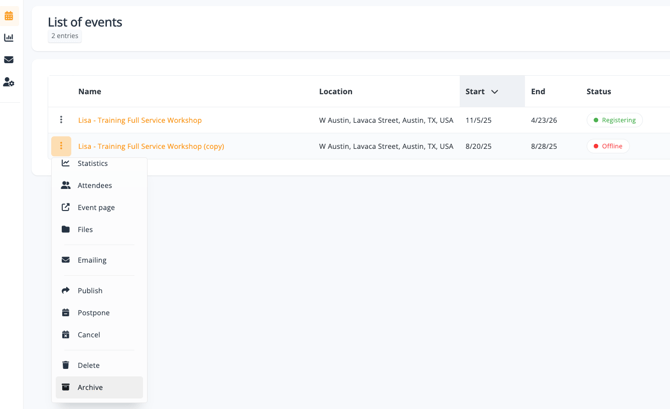
In your profile, the List of Events displays all events you have historically hosted. To archive an event, select it from the list and choose ‘Archive’ from the left-hand dropdown menu. Please note the retention period for any archived events will be 3 years.
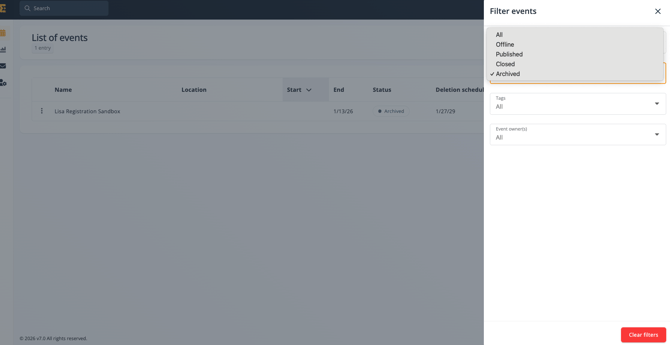
To view the events that have been archived, select the 'Filter' option, then from the 'Status' drop down select 'Archived'.
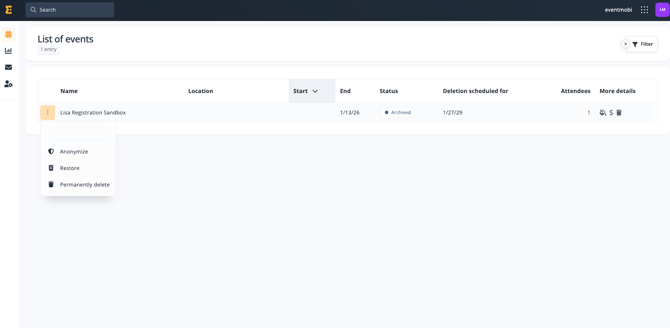
Once an event is moved to the archived folder, it is assigned an ‘archived’ status, and the scheduled deletion date is displayed.
Before the scheduled deletion date, you can restore the event to active status by selecting the three-dot menu and choosing the restore option.
Other available actions include:
-
Permanently delete – removes the event entirely, making it inaccessible immediately.
-
Anonymize – permanently removes all personally identifiable data associated with the event while preserving the event structure and aggregated data for reporting and record-keeping.
⚠️Warning
All archived events will remain in the archive folder for a retention period of 3 years. After 3 years, the event will be deleted automatically and no longer recoverable.